

On September 22, 2026, Anthropic released Claude Opus 5.5. In the last month alone, the Claude app has changed more than in the previous six months, introducing a built-in browser, shared memory, new Projects, in-chat documents and presentations, and a marketplace for add-ons. We're breaking down which of these updates are genuinely useful for those who make money from short-form video—clippers and UGC creators—and where Claude still has its limitations.
What's New: The Models
Claude's current lineup includes four models. The prices shown are in dollars per million tokens (which translates to hundreds of thousands of words) for those using the API; in the Claude app, you only pay a subscription fee.
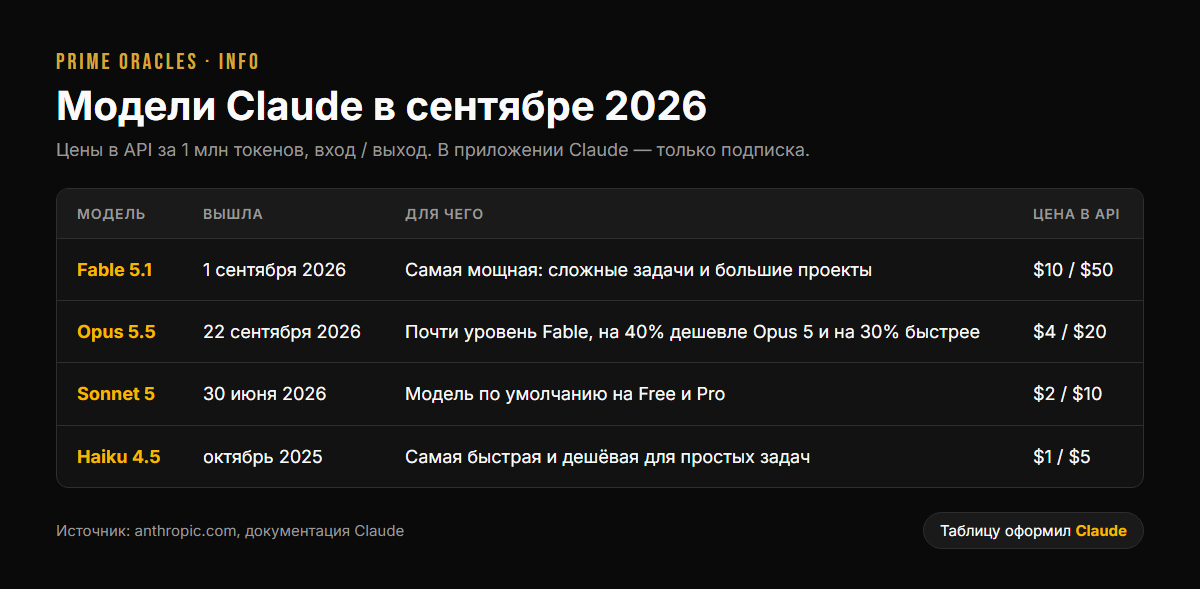
The big news is Opus 5.5. According to Anthropic, it's 40% cheaper to run than Opus 5, responds over 30% faster, and in some tests, it even outperforms the higher-tier Fable 5.1, scoring 66.4% versus 55.8% on a terminal operation test. All new models can process up to a million tokens at once—that's hundreds of pages of podcast or stream transcripts in a single prompt.
Anthropic has promised that Sonnet 5.5 and Haiku 5.5 will be released in the coming weeks.
What's New in the App
One Claude Instead of Two
As of September 16, the standard chat and Cowork—the mode where Claude autonomously handles multi-step tasks on your computer—have been merged into a single application. Tools for documents, presentations (exportable to PowerPoint and PDF), and design are now available directly within conversations.
New Projects
Since September 17, a Project is no longer just a folder of files but a conversation with a "coordinator" that manages several parallel workstreams, with shared memory and a file library. It's currently in beta and available to select Pro and Max users.
Built-in Browser
As of August 26, the desktop app has its own browser: Claude can open websites, read pages, fill out forms, and collect data. You can selectively import logins from your own browser. Alongside this, the Claude for Chrome extension has also been fully released.
Shared Memory
As of August 25, memory is persistent: Claude remembers your style, projects, and preferences between conversations. You can view and edit exactly what it has memorized in the settings.
Voice Mode
Over the summer, voice mode was updated with model selection and access to connected services like email, calendar, Notion, and Canva.
Marketplace
As of September 23, a catalog of add-ons, agents, and partner services is available to connect to Claude.
What Claude Can't Do—Good to Know Upfront
| Task | Can Claude Do It? |
|---|---|
| Read and analyze images and screenshots | Yes |
| Watch videos directly | No. You can't upload an MP4 to the chat. This requires preparation: a transcript with timestamps and keyframes from the video. |
| Generate images and videos | No native model. It's possible via connections to external generation services. |
| Cut and edit video files | Not by itself, but Claude Code can write and run scripts for ffmpeg and Remotion that cut and assemble clips on your computer. |
| Create voiceovers for videos | No. Voice mode is for conversation, not for generating voiceovers. |
And two more things:
- Since August 2026, Claude's text output contains an invisible watermark as required by the European AI Act. It can be checked by regulators and authorized organizations.
- Claude is not available in all countries. The list is on Anthropic's supported countries page: for example, Kazakhstan, Ukraine, and EU countries are included, while Russia and Belarus are not.
Claude for Clipping
Finding the Best Moments in a Stream or Podcast
This is its main application. The workflow described in most tutorials is as follows:
- Create a video transcript with timestamps using Whisper (free, runs locally) or a paid service.
- Feed the transcript to Claude. The one-million-token context window can fit an entire multi-hour stream.
- Ask it to find 10–15 moments, each 30–60 seconds long, with start and end timestamps, a hook for the first three seconds, and an explanation of why the moment is engaging.
Evaluating clips based on criteria works well. For example, in the open-source claude-shorts project on GitHub, Claude scores each segment based on: hook strength—30%, coherence—25%, emotion—20%, value density—15%, and resolution—10%.
A ready-to-use prompt:
Here is a stream transcript with timestamps. Find 12 moments, each 30–60 seconds long, that would work as standalone clips on TikTok. For each moment, provide: the start and end timestamp (start on a pause in speech), the opening hook phrase, why the moment is engaging, and a rating from 1 to 10. Do not pick moments that require context from other parts of the stream.
Live Test: Analyzing Our Own Video
We tested this prompt on our own 12.5-minute video, "Clipping Agency: How to Earn from Clips Without Editing a Single Video." We took the automatic YouTube transcript—362 lines with timestamps—and fed it to Claude Opus 5.5. The analysis took less than a minute.
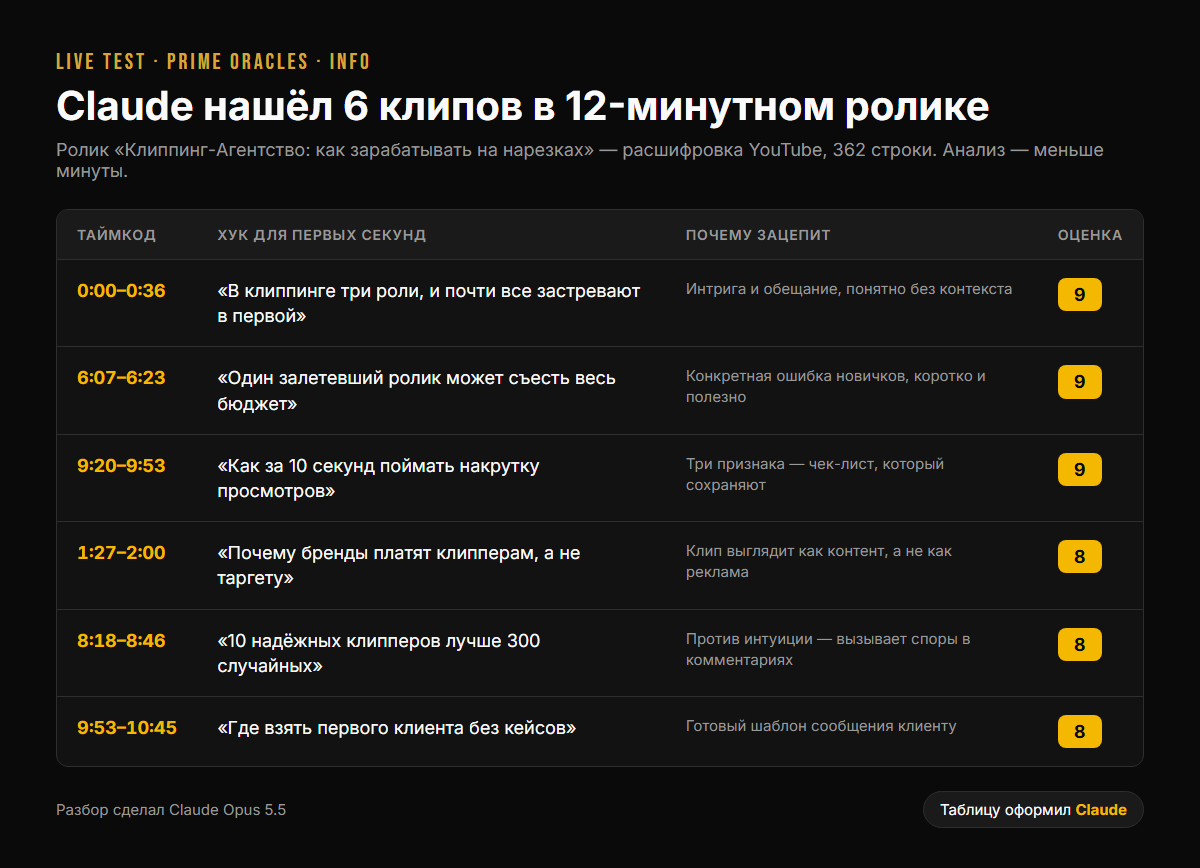
Here's what Claude picked:
- 0:00–0:36 — "There are three roles in clipping, and almost everyone gets stuck on the first one." Intriguing, promising, and understandable without context. Rating: 9.
- 6:07–6:23 — "One viral video can eat up your entire budget." A specific mistake beginners make, short and useful. Rating: 9.
- 9:20–9:53 — "How to spot fake views in 10 seconds." Three signs—a checklist people will save. Rating: 9.
- 1:27–2:00 — "Why brands pay clippers instead of running targeted ads." A clip looks like content, not an ad. Rating: 8.
- 8:18–8:46 — "10 reliable clippers are better than 300 random ones." It's counter-intuitive, which sparks debate in the comments. Rating: 8.
- 9:53–10:45 — "Where to find your first client with no portfolio." A ready-made template for messaging a client. Rating: 8.
What to double-check manually: the second clip is short—just 16 seconds—while the last one is almost a minute long. It's best to review each timestamp before editing. But you get a rough cut list for the entire video in a minute, without having to rewatch it by hand.
Clipping Without Manual Editing
In Claude Code mode, Claude can not only find moments but also build a pipeline: an ffmpeg script cuts the video by timestamp, converts it to a 9:16 format while tracking the speaker's face, and Whisper generates word-by-word subtitles. Developers on forums like Habr and vc.ru have described these workflows in detail, covering everything from transcription to finished vertical videos with subtitles, including self-checking the output.
Practical rules from these guides:
- Subtitles should be no longer than 19 characters per line and on screen for at least one second.
- Trim silence using a threshold of around -30 dB.
- Set a clip's start and end points on pauses in speech, not in the middle of a word.
Subtitles Without Name Errors
A common problem with auto-subtitles is distorted names, brand names, and slang. A proven technique: before transcription, give Whisper a list of names and brands from the stream. Afterward, ask Claude to clean up the text and check the terminology. The output is a ready-to-use SRT subtitle file.
Analyzing a Brief's Requirements
Tasks on CPV platforms are often rejected for minor details: a missing hashtag, showing a show's finale, or a clip being too short. Copy the task requirements into Claude and ask it to create a pre-publication checklist. Then, run each clip through it before posting.
Claude for UGC
Scripts and Hooks
Claude's greatest strength is writing. In UGC script breakdowns, five formulas appear most often, and they are easy to request from Claude:
- Pain → Agitation → Solution.
- "I was skeptical, but it actually works" — a skeptic won over by the product.
- "3 things I wish I knew sooner."
- A script that rides a current trend — tying into a popular format.
- A mini-story from daily life where the product is part of the day, not an ad.
A tip that almost everyone recommends: ask for three different hooks for the same video and test them as separate posts.
Brand Brief → Script
Upload a brief to Claude and ask it to: separate mandatory requirements from nice-to-haves, suggest 5 video ideas, and for the best one, write a second-by-second script (0–3s hook, problem, demonstration, call to action). If the brief is in English and you're not a native speaker, Claude can translate and adapt the text to sound natural.
Images and Video via Connections
Claude doesn't generate images and video itself, but you can connect it to external generation services. You can then ask Claude to come up with a scene, write a prompt for the generator, and send it to the connected service—all without switching windows. Important: generation in these services is usually a paid feature, separate from your Claude subscription.
Your Voice, Not an AI's Voice
The top piece of advice from both Spanish- and English-language guides is the same: Claude's text is a first draft. Give it 3–5 of your own successful scripts and ask it to write in the same style, but always read the final text aloud and edit it to make it your own. UGC viewers can instantly spot generic ad copy.
How We Use Claude Ourselves
We use Claude to power this hub. To give one example: for a roundup of articles on clipping, Claude simultaneously launched three assistants that, in a few minutes, found and checked over 60 articles in Russian, English, and Spanish, filtered out articles about casinos and SEO spam, and verified the date of each one. Then, Claude cross-referenced the topics with real search queries, wrote the articles, published them directly to the hub, and even found and fixed a bug in the language switcher.
The takeaway from our experience: Claude isn't a magic "make a video" button, but a very fast assistant that handles research, analysis, writing, and routine tasks. The creative decisions—what to film and how to present it—are still up to you.
By the way, Claude also created all the tables-as-images in this article, formatting them in the hub's brand style and converting them to image files. The video analysis from the "Live Test" section was also handled by Claude.
Which Plan to Choose
| Plan | Price per Month | Best for |
|---|---|---|
| Free | $0 | Trying it out: scripts and hooks on Sonnet 5 |
| Pro | $20 ($17 if paid annually) | Regular work: scripts, transcript analysis, Claude Code |
| Max | from $100 | Heavy daily clipping and automation |
| Team | from $25 per person | A team of clippers or a UGC studio |
Usage limits are calculated in 5-hour windows, and paid plans also have a weekly limit.
In Short
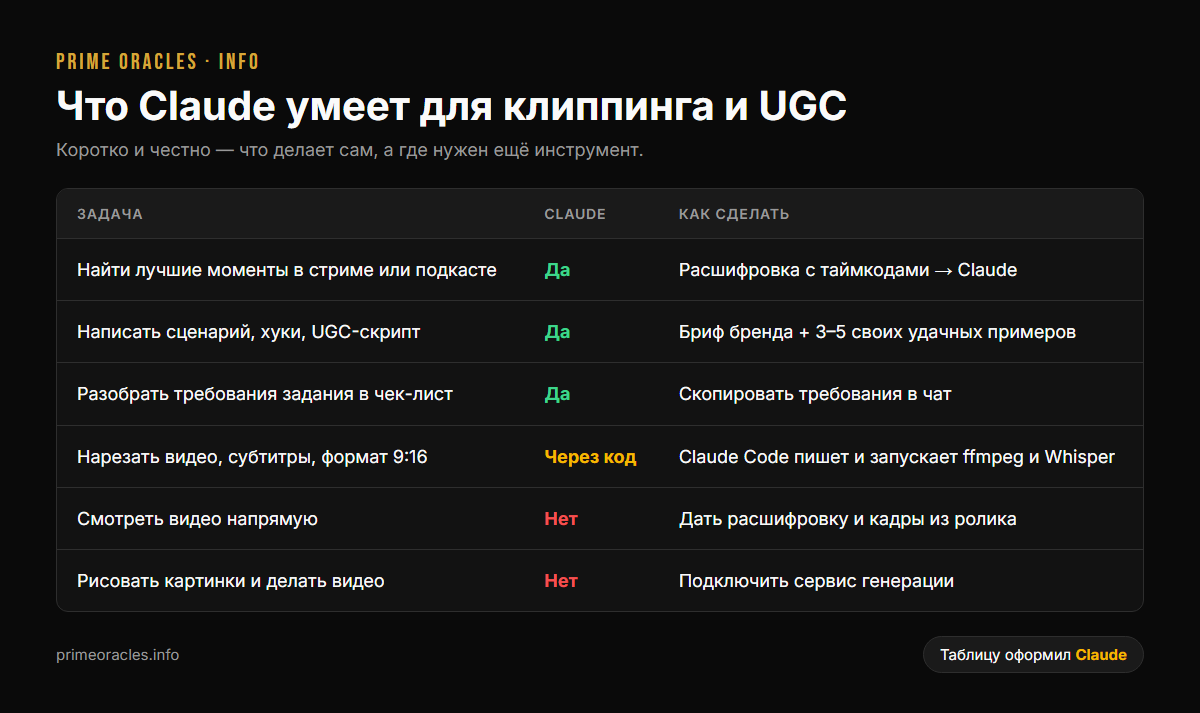
- For clippers: A transcript + Claude = a list of the best moments with timestamps in minutes. Claude Code can set up an automated clipping workflow with subtitles.
- For UGC: Scripts, hooks, brief analysis, and translation and adaptation into English.
- What it can't do: Watch videos directly or generate and edit media by itself. For that, you need ffmpeg, Whisper, Remotion, or connected generation services.
And you can put these skills into practice—creating clips and UGC for CPV rewards—in the "Content Rewards" section on Prime Oracles.