
The past few days have been full of questions like, "Is Instagram blocking links?" "Why can't I add a link?" and "My Telegram link isn't working." The reason is the launch of Meta One—a subscription that turned clickable links in posts and Reels into a paid feature. At the same time, Meta cut back on free links on Facebook, and the two announcements have merged into a single narrative: "Links are now pay-to-play."
We've dug into the primary sources—Meta's press release, help center articles for Meta and Facebook, spam policies, and analyses from the American press—to find out what's really changed, what's still free, how much links in Meta One cost, whether they're worth it, and what to do if your link is actually blocked.
In a Nutshell
- Free Instagram accounts have lost nothing. Just like before, you can have up to 5 links in your profile and use the link sticker in Stories.
- Clickable links in post and Reel captions have never been free—a URL in a caption has always been plain text. Since September 15, you can add them, but only with a Meta One subscription, which offers 4 posts and 4 Reels per month for $49.99.
- The "2 links per month" limit applies to Facebook, not Instagram. As of September 17, professional pages without a subscription can only publish links in two posts or comments per month.
- There is no new official wave of link blocking on Instagram. If a link is being rejected, it's usually due to spam policies or an account restriction. You can check this in the "Account Status" section and appeal the decision.
- A single link slot in Meta One costs from $6.25. Whether it pays off depends on your reach and click-through rate—we've got the formula below.
What is Meta One?
Meta One is a unified subscription for Instagram, Facebook, WhatsApp, and Meta AI that Meta launched on September 15, 2026. It includes over 50 features, while the core functionalities of the apps remain free. According to Meta, there are already 15 million subscriptions and trials. The best features of the former Meta Verified subscription are being moved to Meta One; for now, nothing changes for current Meta Verified subscribers.
There are two groups of plans: for regular users and for creators and businesses.
Plans for Regular Users
| Plan | Price in the US | What You Get |
|---|---|---|
| Instagram Plus | $3.99/month | Extend and "highlight" Stories, rewatch stats, custom fonts |
| Facebook Plus | $3.99/month | A similar set of features for Facebook |
| WhatsApp Plus | $2.99/month | Themes, icons, stickers, more pinned chats |
| Core | $7.99/month | All three Plus plans and more AI: image and video generation/editing, voice effects |
| Premium | $19.99/month | Same as Core, with the maximum AI limit |
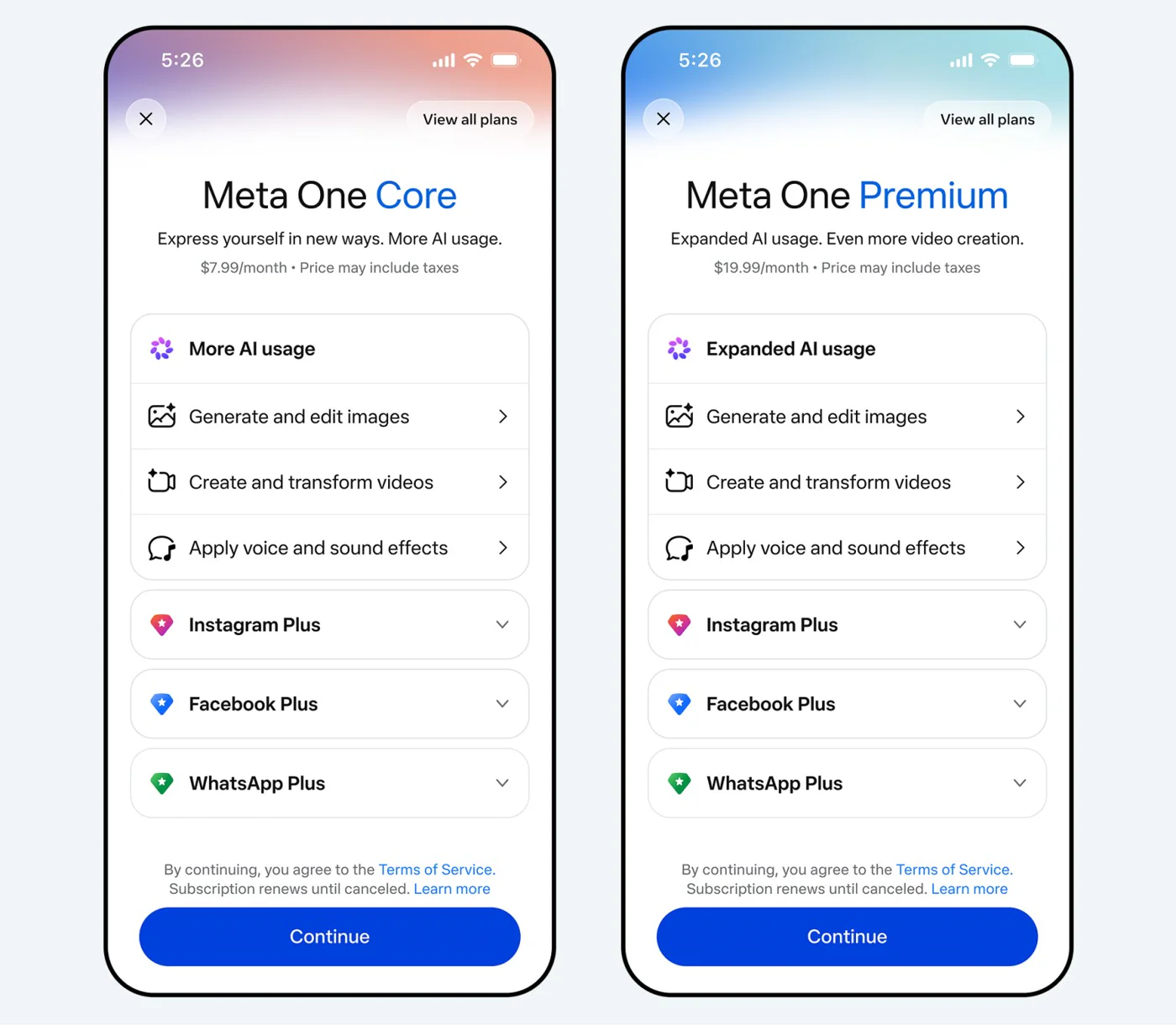
Plans for regular users: these do not include links in posts or Reels. Source: Meta
Links in posts and Reels are not included in these plans—they are only available in the plans for creators and businesses.
Plans for Creators and Businesses
| Essential | Advanced | Expert | Max | |
|---|---|---|---|---|
| Price in the US, per month | $14.99 | $49.99 | $149 | $499 |
| Price in the EU, per month | €16.99 | €54.99 | €169 | €549 |
| Links in Instagram posts | — | 4 | 8 | 12 |
| Links in Instagram Reels | — | 4 | 8 | 12 |
| Links on Facebook | 2, same as without a subscription | 8 | 20 | Unlimited |
| Link page in profile, up to 20 links | Yes | Yes | Yes | Yes |
| Verification badge and account impersonation protection | Yes | Yes | Yes | Yes |
| Scheduled Stories, stats export | — | Yes | Yes | Yes |
| Team access | — | 4 people | 8 | 30 |
Prices are listed as "starting from" and are per profile. You can only subscribe through the mobile app. Meta decides which plans are available to you based on your account activity.
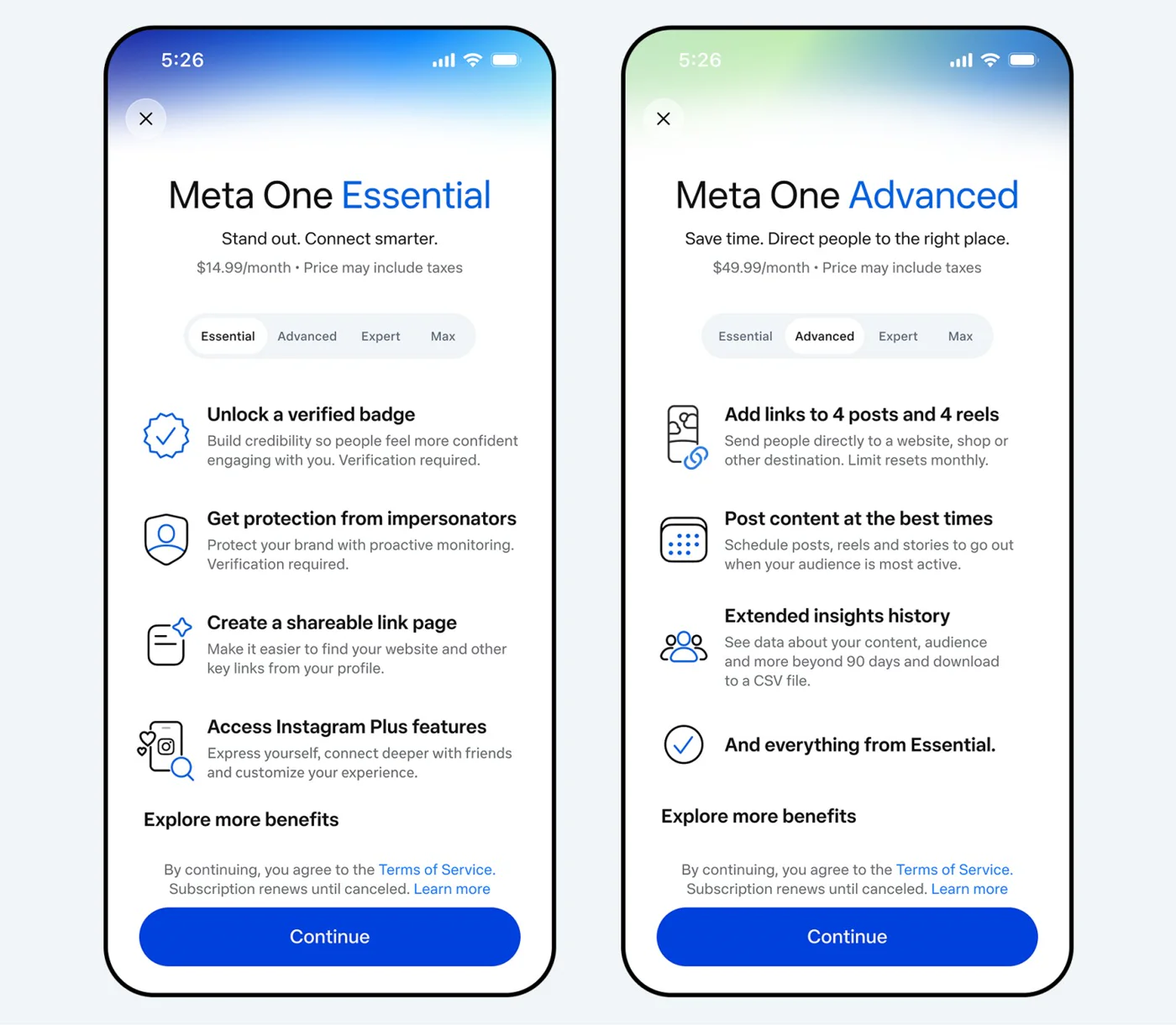
Links in posts and Reels start with the Advanced plan. Source: Meta
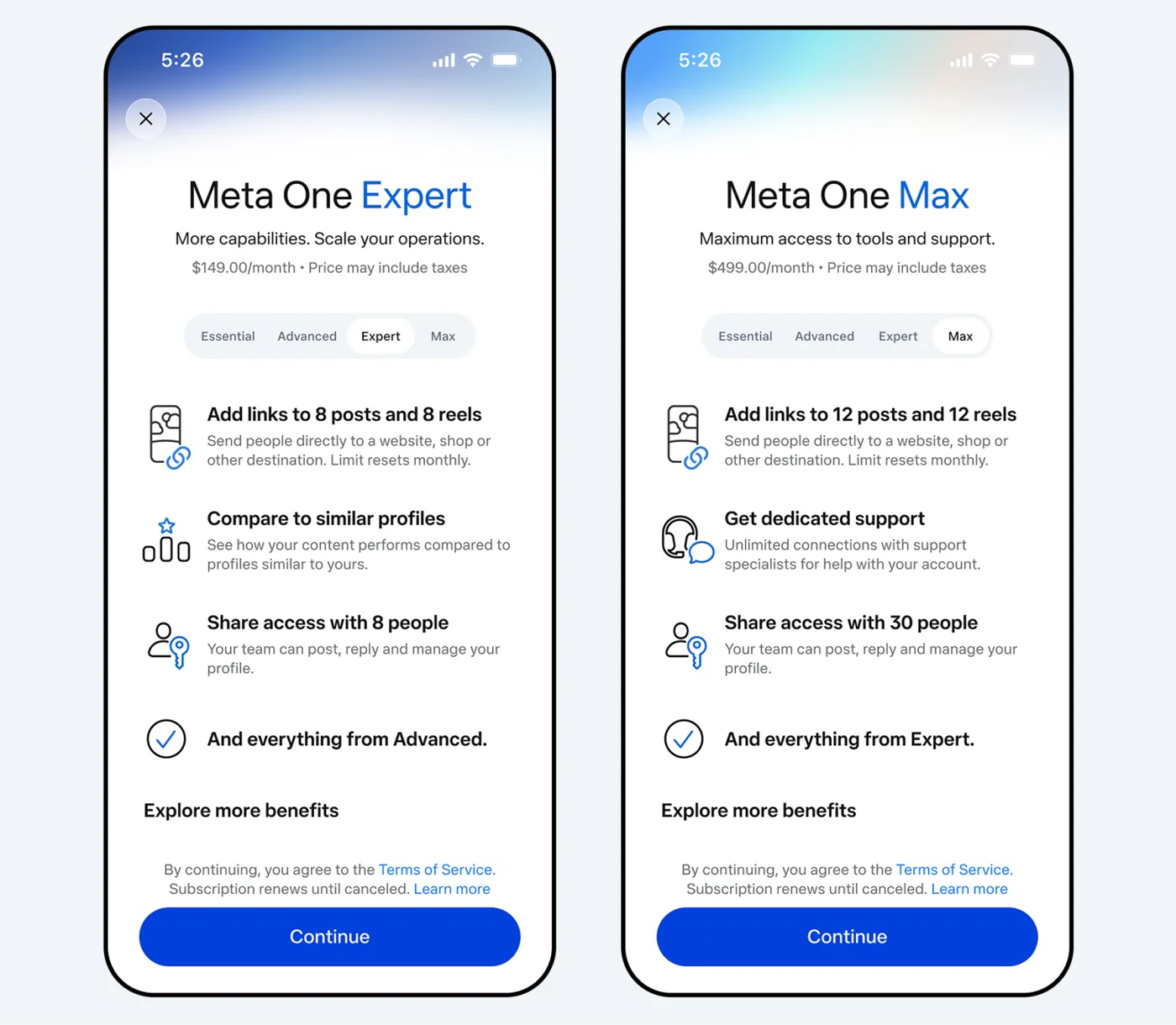
Expert and Max offer more links and team access. Source: Meta
On the Essential and Advanced plans, Meta also promises a prominent "Subscribe" button on Reels and automatic subscription prompts for users who have interacted with your content. Some publications also mention a higher ranking in Instagram search, but we have not found any official confirmation of this.
How Paid Links in Posts and Reels Work
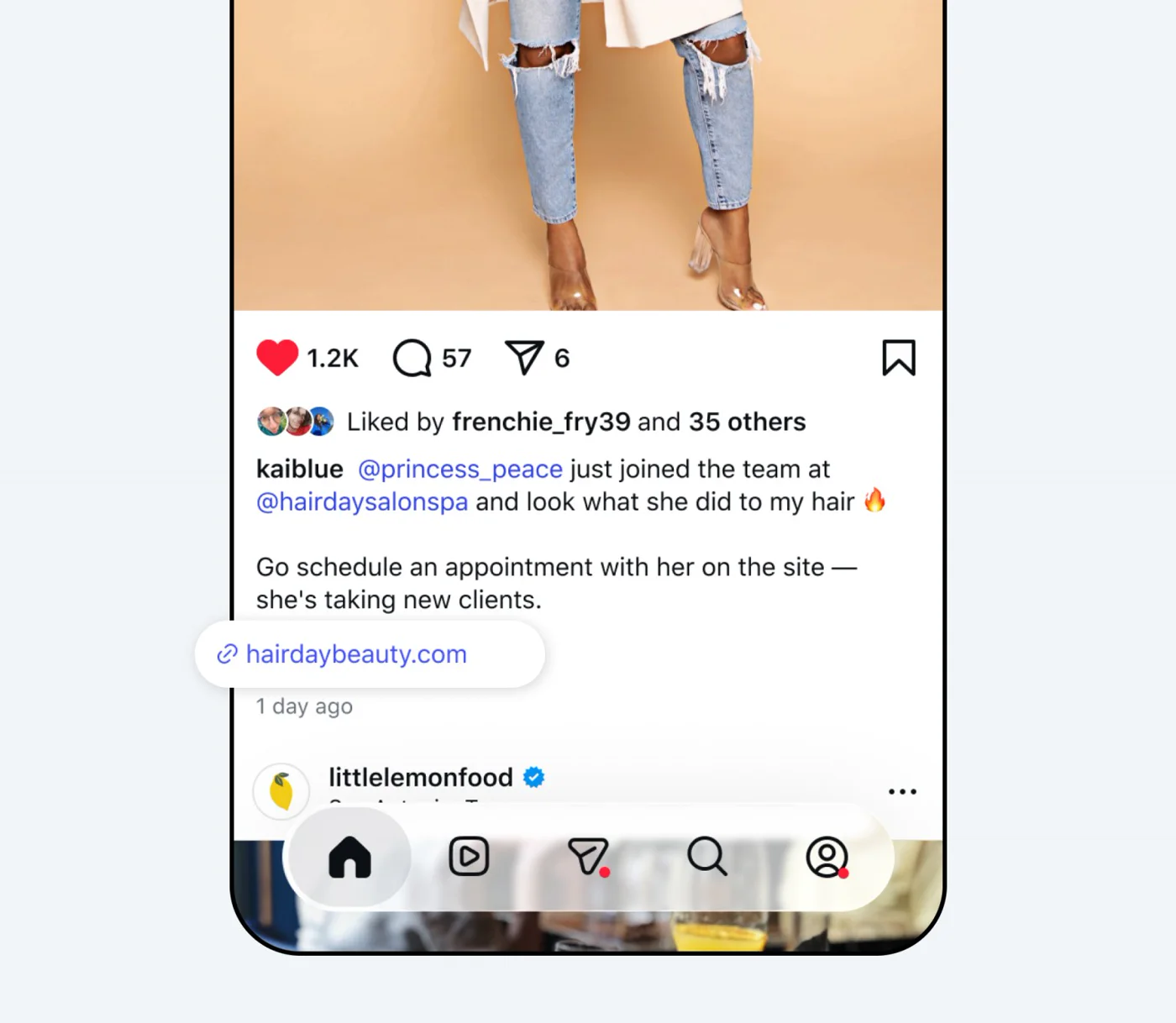
This is what a clickable link looks like below a post caption. Source: Meta
Here are the rules from Meta's Help Center:
- Only for public accounts; not available to teens.
- The link is added during publication: you need to write a caption, then use the button to add a link.
- You cannot edit the link after publishing.
- The limits for posts and Reels are separate and reset on your subscription renewal date. Unused links do not roll over to the next month.
- The limit does not include links to Facebook, Instagram, WhatsApp, and Threads; products from your catalog; or links in ads.
Meta has not yet detailed any reporting on clicks for these links. Therefore, you should use URLs with UTM tags—otherwise, you won't know how many people clicked through.
The 2-Link Limit is for Facebook
This is the most common point of confusion. The link limit was introduced on Facebook: Meta had been testing it since December 2025 and expanded it on September 17, 2026. Professional pages without a subscription can only publish links in two posts or comments per month.
According to the Facebook Help Center:
- Comments with links also count toward the limit.
- Additional links in the comments of a post that already contains a link, links to Meta services, affiliate links, and ads do not count.
- The limit resets on the 1st of each month.
- Publisher pages are exempt from the limit.
To put this in perspective, according to Meta's Most Viewed Content report for Q1 2026, 98.7% of Facebook feed views in the US were on posts without external links.
Why Your Link Might Actually Be Blocked
If you can't add a link to your profile or Story, or if it has disappeared or won't open, the reason is almost never Meta One. Possible causes include:
- Spam policies. Meta prohibits deceptive links, links that don't lead where they promise, redirects to another site, requiring a like or repost to access a link, and URLs that mimic well-known brands. Instagram may remove such a link or prevent you from posting it.
- Account restrictions. For violations, Meta applies a tiered system of penalties, from a warning and disabling certain features—including links—to a ban on publishing for 1, 3, 7, or 30 days.
- New account or an account with a history of violations. The link sticker in Stories has always been unavailable to new accounts and those who have repeatedly violated the rules.
- An issue with the website itself. On July 13–14, 2026, t.me links were down worldwide for 24 hours because the domain was temporarily frozen by the registrar. At that time, "Telegram links weren't working" everywhere, not just on Instagram.
Users on Reddit complained this spring and summer that profile links were only visible to the owner, the link sticker was disappearing, and pages with link collections were being deleted. These are isolated incidents, not announced policy changes—and some were resolved in minutes by filing an appeal.
How to Check and Appeal
- Check your Account Status: Instagram → Settings → Account Status. This shows what content has been removed and which features are restricted.
- Appeal the decision: In Account Status, select the removed content or restriction and tap "Request a Review."
- Check the URL itself: If you suspect a domain has been blocked, you can check it in Meta's Sharing Debugger tool and submit an unblock request there. The review may take a long time.
- Don't repeat the action that got you restricted. While the restriction is active, trying to post the same link again won't work.
What's Still Free and How to Drive Traffic
- Up to 5 links in your profile — Edit Profile → Links.
- The link sticker in Stories.
- Links to Meta services — Threads, WhatsApp, Facebook — do not count toward any limits.
- Replying to comments via DM. Auto-reply services work via Meta's official API: you can send one message in response to a comment within 7 days and can only continue the conversation if the person replies, and only within a 24-hour window.
- A promo code or a short URL mentioned verbally and in on-screen text in your video — this works without any links and also shows you how many people came specifically from that video.
Is Meta One Worth It?
Let's calculate the cost per link slot:
| Plan | Price | Instagram Link Slots | Cost per Slot |
|---|---|---|---|
| Advanced | $49.99 | 8 | $6.25 |
| Expert | $149 | 16 | $9.31 |
| Max | $499 | 24 | $20.79 |
The next question is how many clicks a single link will generate. If you compare it to advertising, the subscription pays for itself when the click-through rate of your linked posts exceeds a certain threshold:
Required CTR = Plan Price ÷ (Ad CPC × Number of Link Slots × Average Post Reach)
A hypothetical example: With the Advanced plan at $49.99, an ad click costing $1.36, and 8 link slots, the subscription pays for itself with a CTR of just ~0.05% on posts with 10,000 reach. With 1,000 reach, you'd need a CTR of ~0.46%.
The cost per click in ads varies by source from $0.40 to $1.80 and higher, and Meta doesn't publish its own data on the CTR of these new links. So, you'll need to run the numbers for your own account. Furthermore, Meta doesn't promise that links will boost your reach.
The takeaway is simple: for an account with high reach and a clear product, the links will almost certainly pay for themselves. A smaller account is better off investing that $50 into the videos themselves.
What This Means for Creators and Brands
For creators. Meta One is an expense: you pay the platform to send people to your link. The alternative is getting paid yourself. On Prime Oracles, brands pay creators for views on their Reels, TikToks, and YouTube Shorts—which usually only requires a link in your profile, and that's still free. Learn how it works in our article "How to Make Money on TikTok, Shorts, and Reels in 2026" and our deep dive on UGC creators.
For brands. Links in posts are now effectively sold individually, and Meta doesn't guarantee reach for a Reel with a link. If you need views, it's more straightforward to pay for the views themselves. Our article "How to Calculate Cost Per 1000 Impressions (CPM)" can help you compare prices across different channels, and our step-by-step guide will walk you through launching a brief for creators.
Disclaimers
- The Meta One press release calls it available worldwide, while Meta's help center describes it as a limited test not available everywhere. Check your app to see what's available to you.
- Prices vary slightly across different official materials: $149 and $499 versus $149.99 and $499.99 reported by third-party services. The prices in our tables are from Meta's press release.
- We have not tested whether it's possible to pay for Meta One from Russia or Belarus through the app stores.
Frequently Asked Questions
Has Instagram started blocking links?
Officially, no. Free links in your profile and Stories are still available. The only thing that became paid are clickable links in posts and Reels, which were never free to begin with.
What is Meta One?
A subscription from Meta for Instagram, Facebook, WhatsApp, and Meta AI, launched on September 15, 2026. For regular users, it costs from $2.99 to $19.99 per month. For creators and businesses, it's $14.99 to $499.
How much do links in Reels cost?
Links in posts and Reels are available in plans starting from the Advanced tier at $49.99/month, which gives you 4 posts and 4 Reels. The Expert plan offers 8 of each, and Max offers 12.
Why isn't my Telegram link working on Instagram?
Most likely, the link was removed or restricted under the spam policy—check your "Account Status." There can also be issues with the domain itself: in July 2026, t.me links were down worldwide for 24 hours.
Can I change a link after publishing?
No, according to Meta's Help Center, you cannot edit a link in a post or Reel after it's been published. Use a URL whose content you can update yourself.
Does the 2-link limit apply to Instagram?
No, that's for Facebook: professional pages without a subscription can publish links in two posts or comments per month.
How do I appeal a blocked link?
Go to Instagram → Settings → Account Status → select the restriction and request a review.
Sources
- Meta press release on the launch of Meta One — Meta, September 15, 2026
- Meta Help Center: Links in posts and Reels
- Facebook Help Center: Link limit for Pages
- Meta's Spam Policy
- How Meta Restricts Accounts
- Account Status on Instagram
- Breakdown of Meta One plans — TechCrunch, September 15, 2026
- Instagram post links become a paid feature — Search Engine Watch, September 17, 2026
- Facebook Pages to be charged for link posts — Social Media Today, September 17, 2026
Meta Platforms is recognized as an extremist organization in Russia, and its activities are banned there.